

Which is the Best Customer Service Software for Small Business
Image: iStock/Dragos Condrea
Customer service software for small businesses enables companies to handle customer queries, support requests, and chats through email, phone, live chat, and social media. These platforms offer capabilities including ticket handling, shared inboxes, automated responses, customer databases, and knowledge bases. Some even have artificial intelligence agents to answer widely asked questions and save time on manual support.
The tools available are different in terms of features, pricing, integration, and upgrades. This guide is a comparison of 10 customer service software options for small businesses, including what each platform offers, what features are included in each plan and what limitations to keep in mind when selecting one.
What is Customer Service Software?
Customer service software is a tool that businesses use to handle customer queries and solve their issues. This tool can integrate and gather information from various channels like email, phone, live chat, and social media into a structured workspace.
Support staff can use it to create and assign support tickets, view and monitor unsolved tickets, keep customer information, and access past interactions.
Further these software platforms come with various features like auto-responses, reporting, chatbots, and knowledge bases to help customers find answers. Plus, as the business expands and more customers visit, these softwares can adapt easily and reduce overall workload as well.
How We Evaluated These Customer Support Tools
Team WhichTop10 evaluated the platforms on four criteria:
- Key features: Ticket management, communication channels, automation, and reporting.
- Pricing: Initial costs, variations in plans, user restrictions, and paid add-ons.
- Integrations: CRM, ecommerce, communication and project management integration.
- Business suitability: Where each platform is suitable and where it might be detrimental to smaller businesses.
Quick Glance At Best Customer Service Softwares
| Software | Best For | Starting Price |
|---|---|---|
| Freshdesk | Ticket management and automation | $19/agent/month |
| Zoho Desk | Affordable support management | Free; paid from $7/user/month |
| Help Scout | Shared inbox and email support | Free; Standard from $25/user/month |
| Zendesk | Growing support operations | $19/agent/month |
| LiveAgent | Email, chat, and phone support | $15/agent/month |
| HubSpot Service Hub | CRM-connected customer service | Free; Starter from $7/seat/month |
| HappyFox | Structured support workflows | $24/agent/month |
| Tidio | Website chat and AI support | Free; Starter from $24.17/month |
| Intercom | AI-assisted customer conversations | $19/seat/month promotional price |
| Crisp | Shared inbox and website chat | Free; Mini from $45/workspace/month |
10 Best Customer Service Management Software for Small Business
Here is a detailed overview of some of the best customer service software that small businesses can use to deal with their customers:
Freshdesk
Freshdesk enables teams to handle customer requests via a shared inbox and ticketing system. Staff can tag conversations, check statuses and follow up on unresolved items. It also provides a customer portal, knowledge base, reporting, and Freddy AI Agent.
Pricing and Plans
- Growth: $19/agent/month. Includes ticketing, shared inbox, customer portal, knowledge base, reporting, and 500 Freddy AI Agent sessions. Additional sessions are $49 per 100.
- Pro: $55/agent/month. Introduces multilingual support, intelligent routing, custom dashboards, multiple SLA policies, and external collaborators. Freddy AI Copilot is available for an additional $29/agent/month.
- Enterprise: $89/agent/month. Introduces Freddy AI Insights, skill-based routing, sandbox, audit logs, and domain restrictions.
The cost of connector app tasks is $80 per 5,000 tasks, and the cost of MCP actions is $15 per 1,000 actions. For more details, please check the Freshdesk pricing.
Integrations: Shopify, Salesforce, Slack, Jira, Microsoft Teams.
Limitations
- More AI sessions and connector usage can add up.
- Intelligent routing and multiple SLA policies require Pro.
- Some advanced reporting and administrative features require Enterprise.
Best For
- Individual inboxes to structured ticket management in small businesses.
- Teams that require ticket ownership and automated follow-ups.
Zoho Desk
Zoho Desk is a ticket management, customer information, and workflow automation tool. It is a viable solution for small businesses, especially those that are already on Zoho CRM or any other Zoho application.
Pricing and Plans
- Free: $0 for up to three users. Supports simple email ticketing.
- Express: $7/user/month. Only 5 users, email support, social tickets, web forms, ticket assignment, workflows, and contact management.
- Standard: $14/user/month. Enables website and app messaging, WhatsApp and other messaging channels, Answer Bot, knowledge base, community forums, and custom reporting.
- Professional: $23/user/month. Introduces telephony integrations, webhooks, Zia AI features, and Blueprint workflow automation.
- Enterprise: $40/user/month. Integrates Zoho SalesIQ live chat, guided conversations, skill-based assignment, multilevel IVR, multibrand help centers, custom modules and sandbox.
Prices are based on annual billing. See Zoho Desk pricing.
Integrations: Zoho CRM, Salesforce, Jira, Slack.
Limitations
- There is a limit of 5 users for Express.
- Higher plans are needed for telephony and advanced workflow features.
- Teams that are not used to Zoho may take time to set it up initially.
Best For
- Small service businesses and startups with tight budgets for software.
- Organizations that are already utilizing Zoho applications.
Help Scout
Help Scout is a customer support platform that emphasizes conversational support. The shared inbox helps staff to assign conversations, collaborate on replies, and view customer history. It also features live chat, knowledge bases, and automated workflows.
Pricing and Plans
- Free: $0 for up to 5 users, with limits on inboxes and contacts.
- Standard: $25/user/month. Contains several inboxes, live chat, SMS, WhatsApp, Instagram, Messenger, knowledge bases, simple workflows, and one simple SLA policy.
- Plus: $45/user/month. Adds advanced workflows, two advanced SLA policies, secure customer portal, round-robin routing, unlimited AI Drafts, and Salesforce, Jira, and HubSpot integrations.
- Pro: $75/user/month. Enables unlimited workflows and SLA policies, multiple routing types, SSO/SAML, HIPAA compliance and more team management features.
Extra inboxes are $10/month on an annual basis. After the initial trial period, Envoy AI resolution pricing is independent. Feel free to check official pricing for more details.
Integrations: Shopify, Slack, Stripe, WooCommerce, WordPress, Salesforce, Jira, HubSpot.
Limitations
- Costs increase as employees increase since it has a seat based system.
- Plus is needed for advanced workflows and round-robin routing.
- For businesses with a high demand for call center capabilities, a different platform might be necessary.
Best For
- Agencies and consultancies who handle customer communication via email.
- Teams that want to use a shared inbox instead of a complicated ticketing system.
You may also like: Top-Rated Free Employee Scheduling Apps for Small Businesses
Zendesk
Zendesk provides ticket management, automation, reporting, and communication with customers. The fundamental plan includes email support, and the Suite plans include live chat, messaging, phone support, and AI features.
Pricing and Plans
- Support Team: $19/agent/month. Includes email ticketing, routing, prewritten responses, customer context, automation, and analytics dashboards.
- Suite Team: $55/agent/month. Includes AI agents, knowledge base, Action Builder, omnichannel routing, messaging, live chat and telephony.
- Suite Professional: $115/agent/month. Adds Admin Copilot, App Builder, Quick Reports, skills-based routing, and an IVR phone tree.
- Suite Enterprise: Custom pricing. Enables intelligent triage, Auto Assist, generative AI for voice, approval workflows, sandbox and custom agent roles.
Prices are based on annual billing. See Zendesk pricing.
Integrations: Shopify, Salesforce, Slack, Jira, Microsoft Teams, PagerDuty.
Limitations
- The basic Support Team plan does not include all Suite communication channels.
- For businesses that require live chat and telephony, Suite Team and higher are required.
- Additional administration and training may be needed for advanced configurations.
Best For
- Expanding businesses expanding their support channels.
- Teams that require more advanced ticket routing, automation, and reporting.
For businesses with more complex deployments, Zendesk professional services for migration and implementation are also available.
LiveAgent
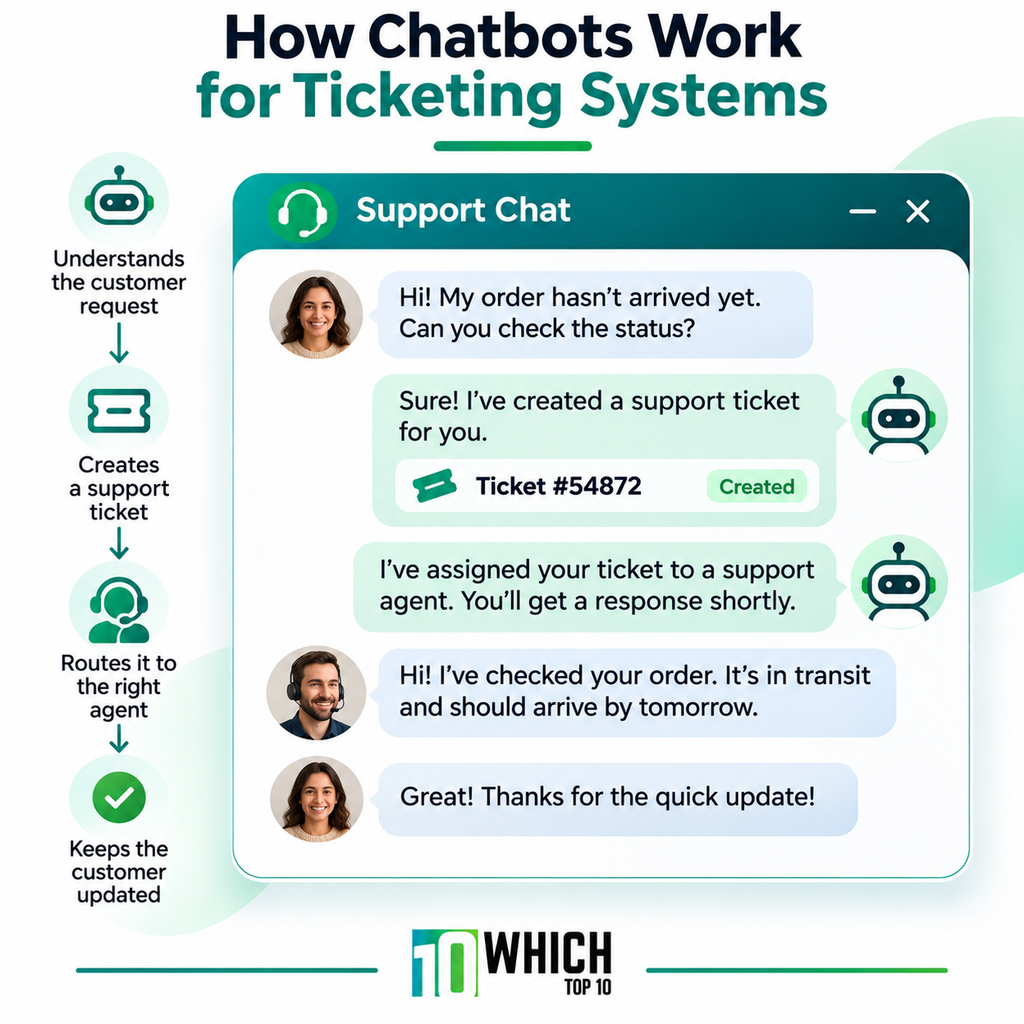
LiveAgent integrates email, live chat, phone support, and social media conversations into a single ticketing system. It also contains a knowledge base, contact forms and automation rules.
Pricing and Plans
- Small Business: $15/agent/month. Contains ticketing, email, live chat, knowledge base, customer portal, contact forms, business automation, and AI agents.
- Medium Business: $29/agent/month. Adds call center, IVR, time rules, reporting, proactive chat invitations, SLA management, SSO, and custom roles.
- Large Business: $49/agent/month. Includes time tracking, audit logs, and more social media platforms like Facebook, Instagram, WhatsApp, and Telegram.
- Enterprise: $69/agent/month. Introduces a dedicated account manager, priority support, assisted channel integration, branding removal and custom billing.
Prices are based on annual billing. AI features are available, but businesses link their own AI provider and pay the AI provider for usage. See LiveAgent pricing.
Integrations: Shopify, WordPress, Magento, PrestaShop, Mailchimp, Pipedrive, Slack, WhatsApp.
Limitations
- The full call center and IVR functionality is not included in Small Business.
- Higher plans are needed for advanced social channels and audit logs.
- Prior to choosing the entry plan, phone and social support needs should be taken into account.
Best For
- Companies handling email, phone, live chat and social media inquiries.
- Teams looking for a single platform for different support channels.
HubSpot Service Hub
HubSpot Service Hub integrates customer support and CRM records. Agents can access customer information and past interactions when responding to requests, assisting sales and service teams with shared data.
Pricing and Plans
- Free: $0 for up to two users, limited features and basic customer service tools.
- Starter: $7/month/per seat, billed on an annual basis. Includes key service functionality, removes HubSpot branding, conversation routing rules, custom email templates, and 500 HubSpot Credits.
- Professional: $90/seat/month. Includes additional help desk and customer success capabilities, plus 3,000 HubSpot Credits. There is a one-time fee of $1,500 for onboarding.
- Enterprise: $150/seat/month. Adds advanced routing and enterprise controls, with 5,000 HubSpot Credits. There is a $3,500 onboarding fee.
Extra HubSpot Credits are $0.010 apiece. See HubSpot pricing page for more details.
Integrations: Jira, Slack, Shopify, Salesforce, Microsoft Teams, Google Workspace.
Limitations
- Professional and Enterprise have high start-up costs.
- Any extra HubSpot Credits used will cost more than the amount included.
- For companies that require only ticketing, the broader CRM platform might not be needed.
Best For
- Companies that link customer service to sales and marketing.
- Teams that require customer history and support tickets.
- Companies that are already using HubSpot CRM.
HappyFox
HappyFox offers ticket management, SLA policies, and a knowledge base. It works well for teams that require a clear workflow for prioritizing requests and assigning responsibility. It also provides an independent Service Desk offering for in-house IT support.
Pricing and Plans
- Basic: $24/agent/month. Unlimited tickets, omnichannel ticket creation, SLA management, knowledge base, and SSO. Only 5 agents are allowed.
- Team: $49/agent/month. Adds multibrand help desk, custom email and domain, custom roles, permissions, ticket queues, and 24/5 email support.
- Pro: $99/agent/month. Adds agent-collision prevention, task and asset management, scheduled tickets, IP restrictions, load-balanced assignment, and 24/7 email support.
- Enterprise Pro: Custom pricing. Introduces agent scripting, 2 TB attachment storage, advanced audit logs, 24/7 phone support, and a customer success manager.
There is also an unlimited-agent Growth plan available for $1,999/month, billed annually, and 20,000 tickets per year. Plans with higher volumes begin at $3,999/month. Check out more details here.
Integrations: Shopify, Salesforce, Jira, Slack, Microsoft Teams, HubSpot, Pipedrive, ClickUp.
Limitations
- Basic has a maximum of five agents.
- Agent-based plans can get costly for large teams.
- Unlimited-agent plans have annual ticket allowances.
Best For
- Companies that have clear support processes and escalation procedures.
- Teams that need custom ticket queues and SLA management.
Tidio
Tidio combines live chat, ticketing, visitor engagement, and AI-powered support. It has Lyro AI Agent to respond to supported customer queries and Flows to automate interactions with website visitors.
Pricing and Plans
- Free: $0. 50 billable conversations, 50 one-time Lyro AI conversations, and 100 Flow visitors reached.
- Starter: $24.17/month. 100 billable conversations, live chat, ticketing, basic analytics, and 50 one-time Lyro AI conversations.
- Growth: Starts at 250 billable conversations, grows to $49.17/month. Adds advanced analytics, user permissions, automatic chat assignment, automatic replies, and macros.
- Plus: From $300/month, plus usage charges. Includes custom conversation limits, departments, ticketing automation, OpenAPI, and priority support.
- Premium: Custom pricing. Includes managed AI deployment, custom analytics, and AI insights.
Review more details on the official Tidio pricing page.
Integrations: Shopify, WordPress, Salesforce, Zendesk, Instagram, Messenger, WhatsApp.
Limitations
- There are limits to the number of human and AI conversations.
- Starter has a limit of 100 billable conversations.
- Businesses exceeding 2,000 billable conversations or 1,000 monthly Lyro conversations need a custom plan.
Best For
- Ecommerce companies that get repetitive product and order inquiries.
- Websites that wish to have live chat and automated customer responses.
Intercom
Intercom brings together a shared inbox, ticketing, customer messaging, help center, and its Fin AI Agent. It is especially beneficial for SaaS businesses that offer support within websites and applications.
Pricing and Plans
- Essential: Promotional price of $19/seat/month against a standard $29 price. Contains Fin AI Agent, Messenger, shared inbox, ticketing, reports, public help center, and basic automations.
- Advanced: $85/seat/month. Introduces several team inboxes, workflow automation builder, round-robin assignment, private and multilingual help center, and 20 free Lite seats.
- Expert: $132/seat/month. Includes SSO, identity management, HIPAA support, SLA management, multibrand Messenger and help center, and 50 free Lite seats.
Fin AI Agent costs $0.99 per outcome. You may also be charged for the use of WhatsApp, SMS, phone and email campaigns. See Intercom pricing.
Integrations: Salesforce, HubSpot, Shopify, Stripe, Jira, Slack, Pipedrive, WhatsApp.
Limitations
- AI outcomes are not included in seat subscription.
- The Advanced and Expert plans are significantly more costly than basic help desks.
- The monthly bill can go up if there is more messaging.
Best For
- SaaS businesses that are helping customers within their apps.
- Companies seeking to leverage AI for customer interactions.
Crisp
Crisp offers website chat, shared inboxes and customer communication tools. It offers workspace-based pricing, with a fixed number of seats, making the cost easier to manage for small teams.
Pricing and Plans
- Free: $0. Features website chat, shared inbox, contact forms, and two seats. Only 100 customer profiles can be used.
- Mini: $45/workspace/month. Includes four seats, shared email inbox, custom email domain, private notes, shortcuts, unlimited data retention, and $5 in AI credits.
- Essentials: $95/workspace/month. Includes ten seats, customer data management, omnichannel inbox, workflow automation, AI chatbot, knowledge base, analytics, and routing rules. Contains $25 worth of AI credits.
- Plus: $295/workspace/month. Features 20+ seats, AI-driven support tools, unlimited task automation, ticketing, 100+ integrations, and white labeling. Contains $75 worth of AI credits. Additional seats cost $10/month each.
Review the Crisp pricing plans for more details.
Integrations: Shopify, WooCommerce, WordPress, WhatsApp Business, Instagram, Zapier, Make, Jira Service Management.
Limitations
- Free is available for a maximum of 2 seats and 100 customer profiles.
- The full workflow automation and ticketing features are not included in Mini.
- AI usage is subject to included credits and additional usage.
Best For
- Small teams who wish to have website chat and shared customer conversations.
- Companies that want to pay by the seat.
- Businesses looking to grow their omnichannel support.
You might also like: Top Picks: 10 Remote Employee Monitoring Software with Tracking & Screenshots
How to Choose Customer Service Software for Small Business
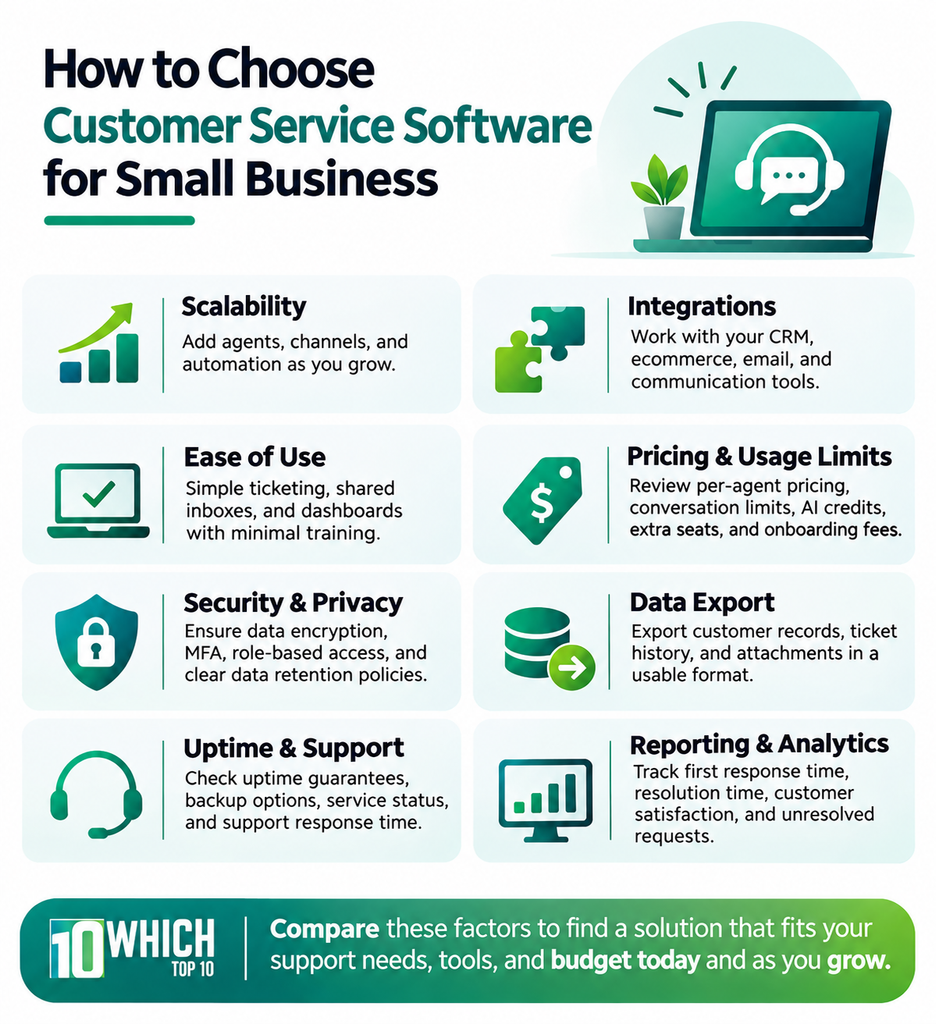
Compare the platform’s ability to meet your team’s everyday support needs, current applications, and budget before deciding. Take these points into account so you don’t end up paying for features you don’t need or having to switch software later on.
- Scalability: Ensure that you can add agents, support channels, and automation without having to switch to a new platform.
- Integrations: Check native integrations with your CRM, ecommerce platform, email and communication tools. Review if integrations need a higher plan or third party connectors.
- Ease of Use: Check for ease of ticket assignment, shared inboxes and dashboards that require minimal training.
- Pricing and Usage Limits: Check per-agent pricing, conversation limits, AI credits, extra seats, and onboarding fees to determine the true monthly cost.
- Security and Privacy: Ensure that the data is encrypted, there is multi-factor authentication, role-based permissions, and policies are established for data storage and retention.
- Data Export: Ensure that customer records, ticket history, and attachments can be exported in a usable format if you choose to switch providers.
- Uptime and Support: Check uptime promises, backup options, service status history, and vendor’s support response time.
- Reporting and Analytics: Ensure that the software can monitor first response time, ticket resolution time, customer satisfaction, and unresolved requests to measure support performance.
Types of Customer Service and Ticketing Systems
Each platform offers a variety of support. Knowing these categories will help you to select the right tool without paying for features that you don’t require.
- Shared inbox: Allows team communication to be organized in a single workspace. Ideal for customer support via email.
- Customer service ticketing system: Logs requests, ownership, status and resolution. Ideal for teams that deal with repetitive support issues.
- Omnichannel help desk: Integrates email, chat, messaging and phone. Best for businesses using multiple customer contact channels.
- Customer support software: Manages customer inquiries and provides automated responses. Ideal for service and ecommerce sites.
- CRM integrated service platform: Links support requests with customer records. Best for businesses that have to share customer data among departments.
- Open-source customer support software: Can be customized and self-hosted under its license. Ideal for businesses that have technical resources and hosting needs.
HappyFox vs. Zendesk: Which is the Better Solution for Small Businesses?
There are two popular customer service platforms, HappyFox and Zendesk, but they are different in their approach. HappyFox is all about customizable ticket workflows, SLA management, automated assignments, and asset management.
It also provides a dedicated IT service desk for companies that are required to handle their own employee requests. This is an ideal option for teams that prefer to have greater control over their support processes.
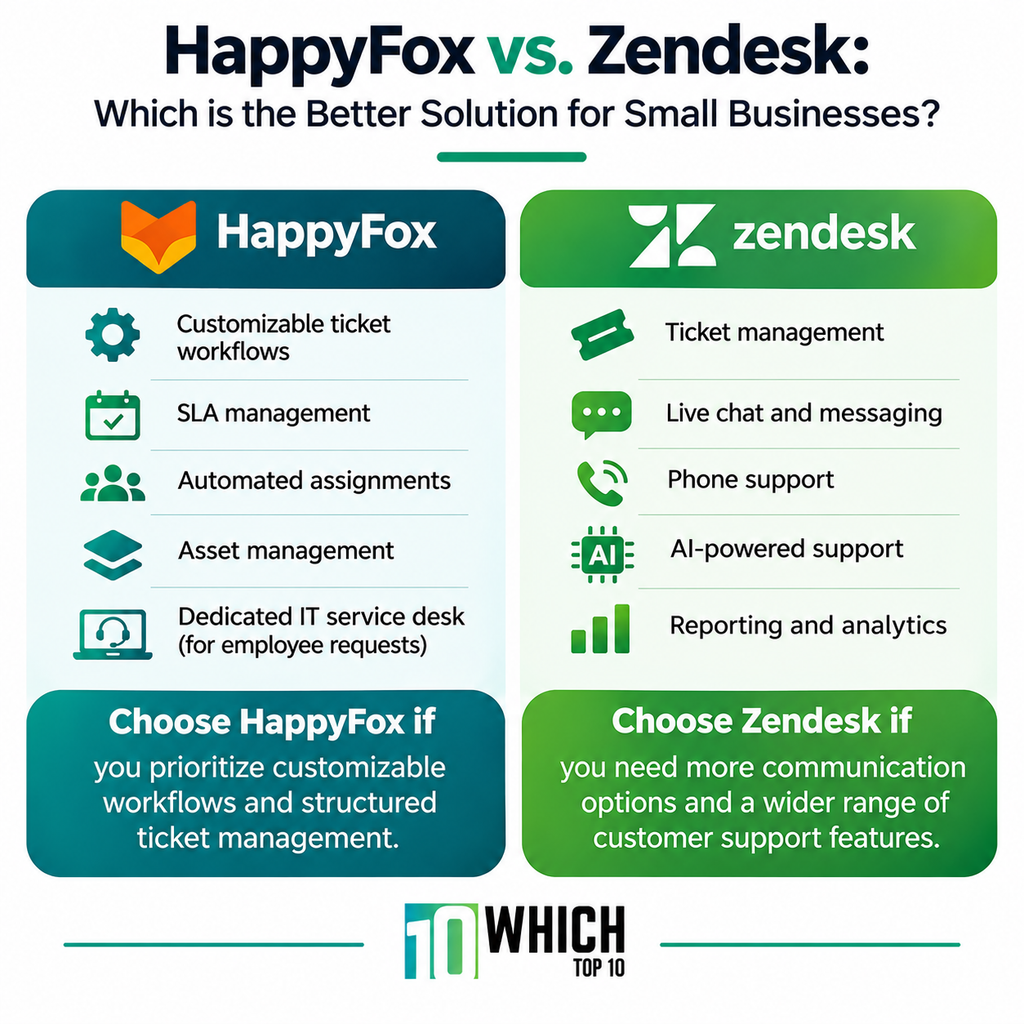
Zendesk offers a more comprehensive customer service solution that includes ticket management, live chat, messaging, phone support, AI-powered support, and reporting. It’s especially beneficial for companies with multi-channel customer support and anticipating expansion.
Choose HappyFox if you prioritize customizable workflows and structured ticket management. If you’re looking for more communication options and a wider range of customer support features, opt for Zendesk.
Conclusion
The type of customer service software you select will depend on the size of your business, the type of customer support you need, and your budget. When deciding, take into account the number of requests your team receives, the communication channels you use, and the features you require, like ticket automation, live chat, reporting, and CRM integration.
Check out the pricing, user limits, and integrations of each plan as well. The right platform should enable your team to handle customer inquiries efficiently, respond to them quickly, and deliver a seamless support experience without the added burden of cost or complexity.
Frequently Asked Questions (FAQs)
Simple setups may take a few days, and more complex implementations that include integrations, data migration, and custom workflows can take several weeks.
Yes. Depending on the migration tools and supported formats, many platforms will allow you to import customer records, ticket history, and attachments.
Track first response time, ticket resolution time, customer satisfaction (CSAT), first contact resolution, and the number of unresolved tickets.
Secure customer records and conversations with role-based permissions, encryption, multi-factor authentication, and frequent data backups.