

Top 10 Best AI Meeting Note Taker Apps (Free & Paid)
Image: istock/seb_ra
AI meeting note taker is a tool that records a conversation, transcribes it to text, and summarizes key points. It can also recognize speakers, mark decisions, and pull out action items, allowing professionals to spend less time taking notes and more time engaged in meetings.
These apps are compatible with video conferencing software like Zoom, Google Meet, and Microsoft Teams, and a few also support in-person recordings. Their features, integrations and free-plan allowances, however, differ.
To help you choose the right AI meeting note taker app for your needs, we’ve tested 10 of them to see how they perform in various scenarios, price points, and workflows.
How We Selected These AI Meeting Note Takers
We evaluated these applications on the basis of five parameters:
- Transcription and summaries: Live transcription, speaker identification, summary generation, and action items.
- Meeting compatibility: Support for Zoom, Google Meet, Microsoft Teams, and other platforms.
- AI capabilities: Meeting search, custom templates, conversational AI, and automated follow-ups.
- Recording options: Online meetings, mobile recording, and in-person conversations.
- Pricing and value: Free allowances, recording limits, storage, and paid features.
The rankings are based on our editorial judgment of these features and their usefulness. No controlled transcription accuracy tests were performed, and the ranking should not be regarded as a laboratory performance result.
Top 10 Free AI Meeting Note Takers
Here is a general overview of the best free AI meeting note taker apps you can use for your business meetings, interviews and many other purposes:
Fireflies.ai
Fireflies.ai is a meeting management tool that automatically records meetings and generates searchable transcripts for people and companies. It automatically joins scheduled meetings on Zoom, Google Meet, and Microsoft Teams, and creates transcripts, summaries, and action items.
It also features an AI-powered assistant, AskFred, which can help users search for specific information or recall previous conversations without having to read through the entire transcript. Fireflies also offers mobile and desktop recording for face-to-face conversations, which can be helpful outside of online meetings.
What do you get?
- Live transcription and speaker identification.
- Meeting summaries and action items created by AI.
- AskFred for searching meeting records.
- Integrations with Slack and productivity applications.
- Recording in person with a mobile.
- AI workflows and automated follow-ups.
Pricing:
Free plan offers unlimited transcription, limited AI summaries and 400 minutes of storage per team. Pro is available for $10/month on an annual basis per user. Business is $19 per user per month, per year, and includes conversation intelligence, team analytics, and unlimited storage. See more details for Fireflies pricing here.
Limitations:
- Free plan has limited AI summary and storage.
- Advanced analytics are available only with paid subscriptions.
- For businesses that have a lot of recording needs, they might require a more advanced plan.
Best for: Companies and professionals looking to handle online conferences, face-to-face discussions, recordings and post-meeting tasks from a single location.
Fathom
Fathom is a great choice for those who wish to capture and summarise online meetings without having to pay for another subscription. The primary benefit of its free plan is that it allows users to record and transcribe meetings for free and provides instant AI call summaries.
It works with Zoom, Google Meet, and Microsoft Teams. Users can also mark key points of meetings and share snippets with colleagues rather than full recordings. It has a search feature for meetings that helps you locate information from past meetings.
What do you get?
- Unlimited free meeting recordings and transcriptions.
- AI-generated call summaries automatically.
- Meeting highlights and shareable clips.
- Browse through the past meeting minutes.
- CRM and calendar integrations.
- Conversational AI and advanced action items (paid plans).
Pricing:
Fathom’s free plan includes unlimited recordings and transcripts. Premium is $16 per user per month (annual billing). The price for the Team edition is $15 per user per month annually, and the Business edition is $25 per user per month annually, with a minimum of two users. View all the details of the plan on Fathom official pricing page.
Limitations:
- Advanced AI summaries and features are limited on the free plan.
- It mainly emphasizes online meetings.
- Paid subscriptions are needed for some team collaboration and CRM features.
Best for: Freelancers, remote employees, and individuals looking for a free AI meeting note taker with unlimited recording and transcription.
You may also like: Top-Rated Free Employee Scheduling Apps for Small Businesses
Otter.ai
Otter.ai is all about transcribing spoken conversations into searchable text. It has a live transcription feature that lets users follow along with the conversation while it is happening, rather than at the end of the meeting.
The platform supports Zoom, Google Meet, and Microsoft Teams. It recognizes speakers, pinpoints key discussion points and creates summaries and action items. Otter AI Chat allows users to ask questions about past meetings as well.
What do you get?
- Speaker Identification and Real-time Transcription.
- Automated meeting summaries and action items.
- AI Chat to search meeting records.
- Integrations with Zoom, Google Meet and Microsoft Teams.
- Mobile recording applications.
- Audio and video file imports on eligible plans.
Pricing:
The Basic plan is free with 300 transcription minutes per month, 30 minutes per conversation and 3 file imports for life. Pro begins at $8.33 per user per month (annual billing), and offers 1,200 transcription minutes per month. Business is $19.99 per user per month (billed annually) and includes unlimited meeting transcription. View more details here.
Limitations:
- The free plan has a monthly transcription allowance.
- Basic users are allowed to import only 3 audio or video files throughout the life of their accounts.
- Advanced features and longer recordings are only available on paid plans.
Best for: Professionals, students, researchers, and groups who require real-time transcription and searchable archives of past meetings.
You may also like: 10 Best AI Tools for Small Business Automation
Bluedot
Bluedot is an alternative to meeting recording. It doesn’t use a meeting bot like the traditional one, but it records conversations via a browser extension or desktop app. It also has a mobile app that enables face-to-face recording.
This is helpful for professionals who don’t want to invite another person to their online meetings or who frequently go to in-person meetings. Bluedot creates AI notes and transcripts after recording. Users can also develop their own templates for sales calls, interviews and internal discussions.
What do you get?
- Bot-free meeting recording.
- On-site recording of face-to-face meetings.
- Transcripts and summaries generated by AI.
- Action items and custom meeting templates.
- Slack, Notion, Zapier, and Make integrations.
- Video recording on higher-tier plans.
Pricing:
The free plan includes 5 meetings for life. Basic is $14 per user/month (annual billing) and offers unlimited audio meetings with a one-hour recording limit. Pro is $20 per user per month, annually, and includes video recording and unlimited recording time. See Bluedot pricing for more details.
Limitations:
- Free plan allows 5 meetings per lifetime.
- Basic is about recording audio, not video.
- Higher tier subscriptions are needed for advanced integrations and administrative features.
Best for: Consultants, recruiters, and professionals who require an AI meeting note taker for face-to-face meetings, but without the need for a traditional recording bot.
Notta
Notta is an online meeting, audio and face-to-face transcription platform. It is also multilingual, which can be beneficial for international teams and professionals who often work with various languages.
It can be integrated with Zoom, Google Meet, Microsoft Teams and Webex. Notta can also create meeting notes, pinpoint speakers, and capture key discussion points. It is also bilingual and can be used for cross-language communication, which is very convenient.
What do you get?
- Live transcription and speaker identification.
- Summaries and action items generated by AI.
- Recording of face-to-face discussions.
- Integration with leading video conferencing systems.
- Audio and video file transcription.
- Bilingual transcription and translation add-ons.
Pricing:
The free plan offers 120 transcription minutes per month, three minutes of conversations, and 10 AI summaries. Pro is priced at $8.17 per month (or $97.99 upfront) and comes with 1,800 transcription minutes per month. Business is $16.67 per seat per month, annually ($199.99 upfront), with unlimited transcription. Purchase your desired Notta plan from their official site.
Limitations:
- Free recordings are limited to 3 minutes per conversation.
- Advanced translation features are available as additional paid add-ons.
- There are some AI features that incur extra costs.
Best for: International teams, researchers, professionals requiring multilingual transcription and translation services as well as meeting summaries.
tl;dv
tl;dv is a tool that allows teams to record conversations, create summaries, and share key discussion points. One of its standout features is especially beneficial for remote teams. You can share short clips of a meeting rather than the whole thing with colleagues.
The platform supports Zoom, Google Meet, and Microsoft Teams. It also provides searchable transcripts and productivity and CRM integration.
What do you get?
- Meeting recording and transcription automatically.
- Meeting highlights and summaries created by AI.
- Searchable meeting history.
- Clips that can be shared for team collaboration.
- Integrations with CRM and productivity tools.
- AI templates and reporting on paid plans.
Pricing:
The free plan offers unlimited recordings and transcripts, but restricts some AI features. Pro is $18 per seat per month (annual billing), and Business is $29 per seat per month (annual billing). Enterprise pricing is customized. You can view more details about each plan here.
Limitations:
- Limited AI prompts, reports, clips, and file uploads for free users.
- Free recordings are deleted automatically after a certain period of time.
- It mainly emphasizes online meetings instead of specific in-person recording.
Best for: Remote teams, project managers and businesses looking to record meetings and share key discussion points.
Granola
Granola is not like applications that use automatic meeting bots. It serves as an AI notepad, merging your handwritten notes with information gathered from conversations.
This allows users to have more control over their final notes. Observations can be added to during discussion and Granola will structure these into summaries. It also provides you with custom templates, shared folders, and AI chat to search previous conversations.
What do you get?
- Meeting notes and summaries generated by AI.
- Customisable note templates.
- Chat with AI using meeting notes.
- Collaborative folders.
- Multilingual support.
- Advanced integrations and API access on paid plans.
Pricing:
The Basic plan is free and includes AI notes, limited meeting history, AI chat, and custom templates. Business is $14 per user per month and includes unlimited notes and history, advanced AI capabilities and integrations. Enterprise is $35/month/user and offers more security and administrative options. Here are the details.
Limitations:
- The history of the meetings is only available for free users.
- It’s not really about enterprise meeting management, but about AI-powered note-taking.
- Advanced integrations are only available for paid subscriptions.
Best for: Individuals and small teams who prefer a simple note-taking experience with AI assistance.
Avoma
Avoma is built for businesses that require linking meeting information with customer relationships and sales activity tools.
It has CRM integrations that enable you to save meeting notes straight to customer records, which means less manual data entry after sales calls. It can also record and transcribe conversations, create summaries, action items, and follow-up emails.
Users can also ask questions about previous discussions via Ask Avoma and develop their own AI templates for various meeting types.
What do you get?
- Auto recording and transcribing of meetings.
- Summaries and follow-up emails created by AI.
- Custom meeting templates.
- CRM integrations and auto-saving notes.
- Ask Avoma to search previous discussions.
- Call recording and sales analytics on qualified plans.
Pricing:
Avoma has a 14-day free trial. Startup is $19 per recorder seat per month (annual billing), and Organization is $29 per recorder seat per month (annual billing). There are no paid recorder seats for viewers and collaborators. See Avoma pricing on the official site for more details.
Limitations:
- The free plan is not permanent.
- It is more expensive than basic transcription applications.
- The advanced CRM and conversation intelligence features are available in higher-paid plans.
Best for: Sales teams, customer success teams, and companies looking to sync meeting notes with CRM records and follow-up processes.
You may also like: Top 10 Business Intelligence Software Compared – Data Analytics, Use Case
Read AI
Read AI is more than just a meeting transcription tool; it also offers conversation insights and meeting analytics.
It captures conversations, creates searchable transcripts and produces reports that identify key points and topics. It also has meeting coaching and analytics tools that can enable managers to review the progress of conversations.
Read AI works with Zoom, Google Meet, and Microsoft Teams. It also integrates with tools like Notion, Salesforce, HubSpot, Jira, and Confluence on eligible plans.
What do you get?
- Meeting transcription and summaries automatically.
- Meeting reports and searchable conversation history.
- Individual meeting coaching and metrics.
- Topic analysis and meeting insights.
- CRM and productivity tool integrations.
- Applications for desktop and mobile devices.
Pricing:
The free version comes with 5 meeting transcripts per month. Pro costs $15 per user per month with annual billing and includes unlimited meeting transcripts, premium integrations, and more AI capabilities. Read AI pricing plan for a detailed overview and custom plans as well.
Limitations:
- The free plan only allows 5 meeting transcripts per month.
- Advanced reporting and integrations are only available with paid subscriptions.
- For those who don’t require advanced meeting notes, analytics features might be irrelevant.
Best for: Managers, team leaders, and businesses looking for meeting summaries and more
conversation insights.
Minutes AI
Minutes AI is a mobile application that records conversations and turns them into structured notes.
It can be helpful for recording client meetings, interviews, lectures, and brainstorming sessions outside of the video conference. The application creates speaker labels, summaries and key discussion points for the recorded content.
Users can also look up recordings or ask questions about specific information that was discussed in a conversation.
What do you get?
- Audio recording and transcription.
- Speaker-labelled transcripts.
- Summaries and key discussion points generated by AI.
- Searchable meeting information.
- AI chat to ask questions about recordings.
- iPhone, iPad, and Apple Watch support.
Pricing:
Minutes AI is free to download and has in-app purchases available. It has $14.99 and $99.99 prices for Unlimited Access in its US App Store listing. See more details on the official site and download it to your mobile.
Limitations:
- The version of the App Store that has been reviewed is for Apple devices.
- It provides fewer CRM and business collaboration capabilities than enterprise meeting assistants.
- The price of in-app purchases may differ depending on the region.
Best for: People, students, journalists and professionals who wish to record conversations face-to-face and automatically create a summary from their mobile devices.
Built-In Alternatives People Use: Microsoft, Google, Zoom
You may not need a separate application to generate meeting notes. Larger video conferencing platforms also have built-in AI capabilities. Such as these:
Microsoft Teams
Microsoft Teams brings AI support to online meetings with Microsoft 365 Copilot and Teams Premium. These features can summarise conversations, identify key discussion points, recommend action items and respond to questions on meeting content.
Users can also view meeting summaries to catch up on discussions they missed. The primary benefit is that meeting information remains integrated with the Microsoft 365 environment, simplifying the management of conversations alongside the work that organisations are already doing.
Google Meet
Google Meet’s Take notes for me feature provides meeting assistance using Gemini. It automatically captures important discussion points and organises them into a Google Doc. Meeting recaps provide access to meeting summaries, review key information, and catch up on conversations.
The notes are linked to Google Workspace, allowing users to easily organize, edit, and share notes in Google Docs.
Zoom
AI Companion and My Notes are Zoom’s AI-powered meeting support features. These features enable users to highlight key points, record their own meeting notes, and create meeting summaries.
It can also assist participants in recalling information from past conversations and catch up on meetings. It’s also integrated with Zoom Workplace, which makes it a convenient choice for teams that are already using Zoom for their regular video conferences.
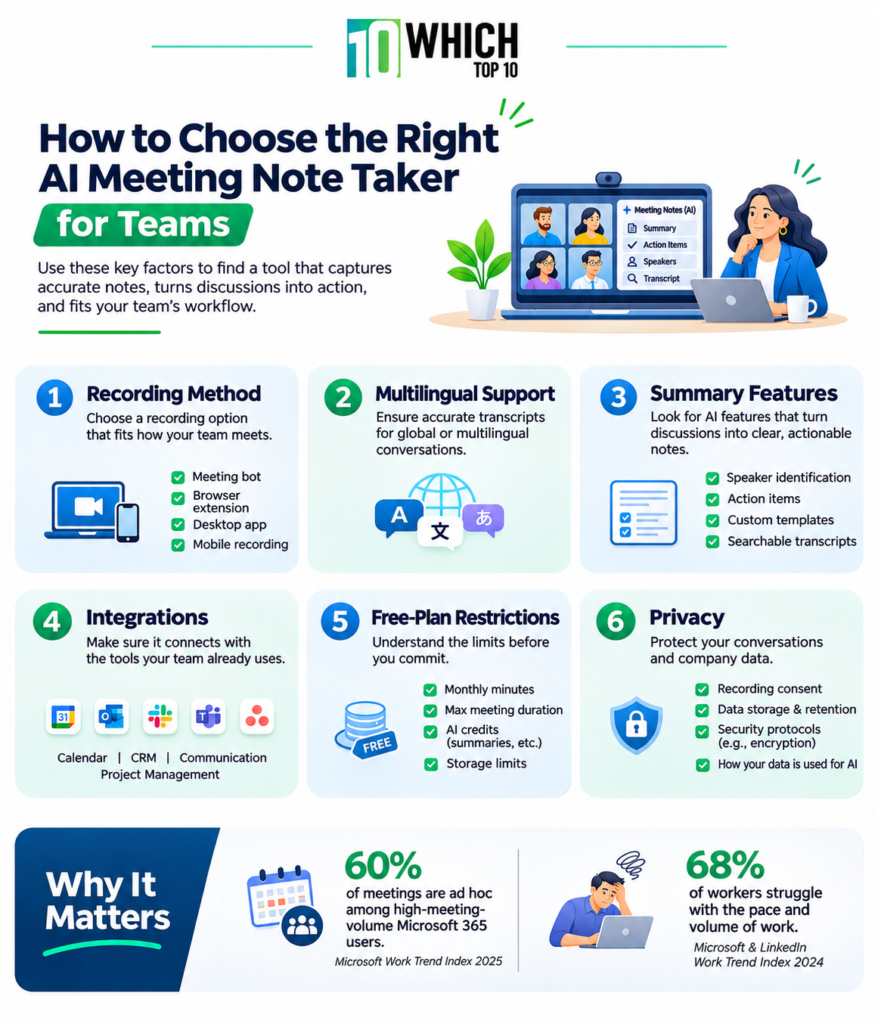
How to Choose the Right AI Meeting Note Taker For Teams
When selecting a meeting note taker, keep the following important points in mind:
- Recording method: See if the application has a meeting bot, browser extension, desktop software or mobile recording. This is important if you are attending meetings in person regularly.
- Multilingual support: If your team has international clients or multilingual conversations, be sure to check the supported languages in transcription.
- Summary features: Check out the speaker identification, action items, custom templates, and searchable transcripts.
- Integrations: Ensure that the tool integrates with your calendar, CRM, communication platform, or project management software.
- Free-plan restrictions: Check minutes, duration limits, AI credits, and storage. Not all unlimited transcripts are necessarily unlimited AI summaries.
- Privacy: Check recording settings, data storage policies, security protocols, and AI data usage before recording private conversations.
Conclusion
An AI meeting note taker should streamline meetings, not complicate your workflow. When selecting one, take into account how often you record conversations, the platforms you use, and whether you require features like live transcription, action items, or in-person recording.
Also, be sure to consider free-plan limitations. A tool can have unlimited recording capabilities but have limited AI summaries or storage, which is not as convenient for everyday use. Compare different plans and select an application that offers the features you need and don’t overpay for features that you do not.
Frequently Asked Questions (FAQs)
Yes. Speaker diarisation is a feature of many AI meeting note takers that helps to segment conversations and identify who is speaking. They might start off giving them general names like Speaker 1 and Speaker 2, though. These labels may need to be edited by hand, particularly if the participants’ voices are similar or if they speak over one another.
While AI-generated notes can be helpful, they should not be a substitute for the actual meeting minutes. A meeting organiser should review key information, including formal decisions, approvals, voting results and assigned responsibilities, prior to the distribution of minutes.
Transcription can be impacted by overlapping conversations. An AI tool can mix up statements, leave out words, or misrepresent a comment as being from a different speaker. To create clearer transcripts, use separate microphones, minimize background noise and have participants speak one at a time.
Most note-taking software will enable users to edit, correct or re-organise the notes that they have created. It can be helpful for clarifying technical terms, correcting names of speakers, removing irrelevant discussion points and clarifying decisions that the AI might have misunderstood.
Start with clear audio. Place microphones close to participants, minimize background noise, and avoid having multiple people speak simultaneously. You can also add frequently used technical terms, product names, and industry-specific vocabulary where the application supports custom vocabulary.