

Top Picks AI Tools for Social Media Management for 2027
Image; istock/ metamorworks
The top AI social media management tools streamline processes with features such as automated content creation, intelligent scheduling, performance analysis, and workflow automation. There are platforms that handle everything from publishing to other tasks, and there are platforms for specific aspects like audience engagement, reporting or team collaboration.
In this guide, we’ll compare 10 platforms in terms of their AI features, publishing tools, analytics, pricing, and other real-world constraints to help you select the best platform.
Key Takeaways
- Follow Up Boss is the top pick for lead follow-up. It starts at $69 per user per month ($58 billed annually), includes texting on every plan and has a 14-day trial, though calling costs $39 extra per user on the Grow plan.
- Free and low-cost options cover solo agents and small teams. HubSpot CRM is free for 2 users, Zoho CRM is free for up to 3, and Bigin by Zoho is free for one user (500 records). Wise Agent covers 5 users for $49 a month ($42 annually).
- Teams that want a website and CRM together should compare Real Geeks and Lofty. Real Geeks is $399 per month plus a $500 setup fee, and Lofty is reported from about $449 per month plus $500 (third-party figure, so confirm in a demo).
- Large brokerages should look at BoldTrail. It’s a full platform with recruiting and back-office tools, but pricing is quote-based, with a reported figure of about $1,099 per month.
- Watch the full cost before you commit. Add-ons, setup fees, free plan limits and promo prices change the total, so trial your top two tools with real leads before buying.
There’s more to social media management than posting content. There are a lot of things businesses have to learn, write, create, schedule, respond to customers and measure. These activities can be time consuming if done manually on several platforms.
What Are AI Tools for Social Media Content Creation?
AI tools for social media content creation are software applications designed to assist businesses in the creation and customization of content for various social media platforms, leveraging artificial intelligence. They can come up with captions, post ideas, write hashtags, create images, make short videos, and repurpose existing content in a variety of formats.
These tools leverage artificial intelligence models to interpret textual instructions, process information, and create content following the provided instructions. An example of this is when a business can describe a product and then use an AI tool to generate promotional content for Instagram, LinkedIn, and Facebook.
AI tools eliminate repetitive creative tasks, enabling marketing teams to generate content in a timely and consistent manner. But human editing is still crucial for accuracy, originality and brand consistency.
How We Selected These Social Media Management Tools
These platforms were compared on the basis of five practical criteria:
- AI features: Caption generation, content suggestions, AI-powered responses, and performance analytics.
- Publishing: Social networks, scheduling, and content calendars support.
- Analytics: Engagement reports, competitor tracking and performance insights.
- Workflow management: Team collaboration, approval processes, customer interactions and integrations.
- Value: Subscription fees, account restrictions, AI usage, and features included.
The platforms chosen are those that offer real social media management features instead of graphic design or content creation.
10 Best Free AI Tools for Social Media Management
Here is a list of top free AI tools for social media management you can use in your business. Read all the details carefully before choosing the right one. We have divided the tools into 4 categories for your convenience.
Content Creation
Tools that help create social media posts, captions, images, and videos using AI
- Zoho Social
Zoho Social is a social media management tool that enables companies to control a number of social media channels via a single interface. It’s also built-in with different Zoho apps, making it helpful for businesses already leveraging its CRM and customer administration applications.
What it does: Post scheduling, conversation monitoring, calendar organization and account analytics. It has a SmartQ feature that advises you when to publish based on the actions of your audience. Additional features are also available, such as higher plans with approval workflows and CRM integrations.
AI capabilities: Zoho has a Zia assistant that can draft messages, recommend hashtags and pictures, reword content and create a response to a customer’s inquiry. When users run out of their OpenAI monthly credits, they can use the BYOK feature to link their personal OpenAI account.
Best suited for:
- Smaller businesses with multiple social media pages.
- Companies already have positions and users in Zoho Software or other Zoho programs.
Limitations:
- All Free, Standard and Professional plans include access for a single team user.
- Monthly credits could be a limitation for generating frequent AI content with Zia.
- Other brands & team members will need paid add-ons.
- Higher subscriptions are required for advanced reporting, CRM integration, and approval workflows.
- ContentStudio
ContentStudio is a tool that integrates AI content creation with social media scheduling, analytics, and team collaboration.
What it does: Users can brainstorm a content concept, create marketing content, tailor it to various social networks, and schedule it via the platform’s content calendar. It also has a media library and campaign management features that assist teams in organizing their publishing activities.
AI capabilities: AI Studio creates captions, images, and videos. It has brand knowledge and brand voice features that assist businesses with consistent messaging. Users can also create LinkedIn carousels and X threads, which will save them from preparing content for each platform separately.
Best suited for:
- Content marketers create various kinds of social media content.
- Agencies and small businesses with multiple social accounts.
Limitations:
- The usage allowances for AI text, image, and video generation are different.
- The Standard plan only allows one user, making collaboration more difficult for larger teams.
- Later
For businesses and creatives that rely on Instagram as well as other visual platforms, Later is very helpful. It has a visual content calendar that enables users to organize images, videos and future campaigns.
What it does: Users can create, organise and schedule Instagram posts, Stories and Reels, plus content on other supported social platforms. It also has a calendar preview, which aids those who need to keep a steady publishing schedule. 14-day free trial available
AI capabilities: Later provides tools to produce ideas and captions for your content using AI. It also includes suggested publishing times for those platforms supported, enabling your users to choose the appropriate scheduling.
Best suited for:
- Instagram content creators, businesses managing visual marketing campaigns.
- Companies that specialize in producing photos, videos, and promotional messaging for ecommerce brands.
Limitations:
- Starter has a limited number of credits available for its AI (5 credits per month).
- With a monthly cap of 30 posts on a social profile, it isn’t going to work for companies that post regularly.
- Its primary advantage is visual planning abilities, which may not be for companies that favor more complex social listening and customer servicing solutions.
You may also like: Top 10 Email Marketing Tools for Small Businesses
Scheduling / Posting / Engagement
Tools that help schedule posts, manage publishing calendars, respond to comments, and handle audience interactions
- SocialPilot
SocialPilot is a social media management tool that’s ideal for small companies, advertising and marketing teams, and agencies. It not only simplifies publishing, scheduling, analytics, and collaboration but also integrates AI-powered content generation features.
What it does: It supports users in handling various social accounts, along with post scheduling, organizing your campaigns on a calendar and monitoring engagement. Higher plans also offer client approval workflows as well as white-label reporting for agencies. You can get a 14-day free trial without using a credit card.
AI capabilities: It is equipped with AI Pilot that assists in creating hashtags, captions, and various formats of social media posts. Can also customize material for particular platform specifications, including word counts, tone and style. Its AI Scheduler helps to schedule publishing.
Best suited for:
- Marketing agencies that have multiple accounts to handle.
- Organic, small companies that require cheap publishing and scheduling software.
- Teams that have a routine for producing and approving large batches of social media content.
Limitations:
- AI Pilot requires a monthly credit so if you need to make content on a regular basis then you might need a better plan.
- The Premium plan is needed for client approval or to create white label reporting.
- The more social accounts and users, the more it costs to subscribe.
- Vista Social
Vista Social is a single solution for social media publishing, engagement, analytics and automation. It is meant to be used by businesses and agencies who have multiple social accounts.
What it does: You can schedule posts, manage messages/comments, monitor reviews and create performance reports for your team. The DM automation capabilities also enable businesses to answer the most frequent inquiries from customers and gather leads by engaging in social dialogue.
AI capabilities: It has a built-in AI assistant called Ask Vista, which connects user account information to assist users in planning content, scheduling posts, creating reports, and interacting with messages.
It also has AI-powered agents that can handle repetitive tasks, like generating weekly reports, checking inboxes, and flagging comments for human review. Scheduled agents are available on Advanced and higher plans.
Best suited for:
- Businesses with multiple social media brands that are growing.
- Publishers, reporters and customer engagement agencies.
- Businesses seeking AI-based social media automation agents.
Limitations:
- The monthly amount of credits is allocated for AI operations, and extra credits must be paid for additional operations.
- Listening on external social platforms, websites and news begins at $75 a month.
- An extra $29/month per profile is needed for X profile publishing and analytics.
- NapoleonCat
NapoleonCat is a social media publishing, analysis, customer engagement, and automation moderation software. It can be especially beneficial for businesses that get a ton of comments and messages.
What it does: It has a social inbox feature which collects information from all connected social media platforms and groups their conversation. The team can respond to it and manage customer interactions. An automated moderation rule could set filters to block spam, delete comments, and answer the same question a number of times.
It has a free 14-day trial and no credit card is needed.
AI capabilities: NapoleonCat’s AI Assistant can correct grammar, set tone, and recommend hashtags that match your brand. It also creates responses based upon brand voice, commonly asked questions, and user-defined rules.
Another noteworthy aspect of AI is to analyze sentiment, capturing positive, negative, and neutral interactions. It can detect spam and hate speech detection can initiate preset moderation responses like hiding or forwarding content.
Best suited for:
- Companies with large numbers of comments & messages.
- Customer support and community management teams.
- Brands that require automated post moderation and quicker response processes.
Limitations:
- The AI Assistant needs an extra subscription on applicable paid plans.
- Rules are an automatic moderation prerequisite and businesses need to configure rules.
- Social Inbox storage is plan dependent and when your message volume gets too high, you may need to upgrade to a larger plan
Analytics and Listening
Tools that track social media performance, monitor brand mentions, analyze audience sentiment, and measure campaigns.
- Sprout Social
Sprout Social is a tool designed to facilitate business communication with its customers and gain insight into its social media performance. The Smart Inbox consolidates conversations from all of its connected social accounts for easier management and response.
What it does: Companies can keep track of client discussions, manage comments, measure engagement and generate comprehensive performance reports. It also has reporting tools that can assist marketing teams in assessing their campaign results and competitor activity.
AI capabilities: Trellis is Sprout’s AI agent for working with social media data and generating insights. AI Assist enhances social media copy and customer responses. AI post enhancement comes with Professional, and AI reply enhancement is included in Advanced.
Best suited for:
- Well-established companies that are getting a lot of engagement.
- Marketing departments require a detailed social media reporting and customer care solution.
Limitations:
- Can get costly when several employees are accessing it per seat.
- The advanced AI functions and customer management are only available in higher-tiered subscriptions.
- It can take some time for new users to get to know its dashboards, reporting tools and workflow settings.
More Social Media Tools: Top 10 Social Media Management Tools for Nonprofits
- Brandwatch
Brandwatch combines social media publishing, social listening and performance measuring based on the audience’s engagement with your brand’s presence across social media.
It’s made for more substantial marketing teams that require dealing with social media tasks throughout various networks and areas.
What it does: It has a content calendar that enables teams to schedule and organise their organic and paid content. The Engage module has a central inbox to handle customer conversations, the Measure and Benchmark module let businesses measure campaign performance and compare results against the competitor.
AI capabilities: Brandwatch’s AI assistant, Iris is used across multiple platform modules. Iris Writing Assistant can create and edit posts, edit customer replies and enhance advertising copy. Other AI capabilities include summarizing social conversations, analyzing the content of posts, and giving insights into the discussions of social audiences.
Best suited for:
- CMOs and marketing teams at enterprise companies who have regional social media teams.
- For companies that require in-depth competitor analysis and social listening capabilities.
- Publishing and customer engagement and performance linking organizations.
Limitations:
- It has a lot of features that may be unnecessary for smaller businesses.
- Additional configuration may be needed to set up listening queries, reporting dashboards, team workflows, etc.
Team / Client Collaboration Management
Tools that help teams manage client accounts, share feedback, organize content workflows, and handle approvals.
- Sendible
Sendible is a social media management tool for agencies and businesses with multiple brands or accounts. It offers individual workspaces, publishing solutions, reporting and interaction management.
What it does: It allows agencies to work on several clients from various fixed workstations, schedule posts in bulk, check comments and create performance reports. Its content libraries also help organize vital marketing content for reuse across campaigns. It offers a 14-day free trial.
AI capabilities: AI Assist generates social media captions, rewrites inputted social media copy and checks spelling. It also features Smart Compose that enables preparation and scheduling of content across various social accounts.
Best suited for:
- Digital Marketing Agencies with several clients.
- Any business that requires discrete work spaces and reporting on social media.
Limitations:
- The Core plan comes with only one workspace, which might not be enough for agencies with multiple clients.
- More advanced approval workflows, branded reports and extra workspaces will require higher plans.
- Teams requiring advanced social listening may need a separate monitoring solution.
- Planable
Planable is a social media management tool that provides content planning, collaboration and approval workflows. It’s especially beneficial for agencies requiring clients to approve they post, as it allows them to do so easily.
What it does: Teams can create content in several workspaces, view posts, provide feedback and approve campaigns at each step. Feeds and Calendar views make it easier to preview future content before it is published.
AI capabilities: Planable has AI post generation and rewriting features for marketers to plan and optimize social media posts. It also has an MCP connector that enables other compatible AI assistants to connect to Planable and handle content in workspaces.
Best suited for:
- Marketing agencies that require client content approvals.
- Social media teams that are working with multiple reviewers and multiple publishing stages.
Limitations:
- There are monthly publishing caps with the Basic and Pro plans.
- Additional features for advanced analytics and social inbox are available at an additional cost.
- For agencies with multiple clients, extra workspaces might be required, which will add to the subscription fees.
You may also like: Best AI SEO Optimization Tools for Small Business
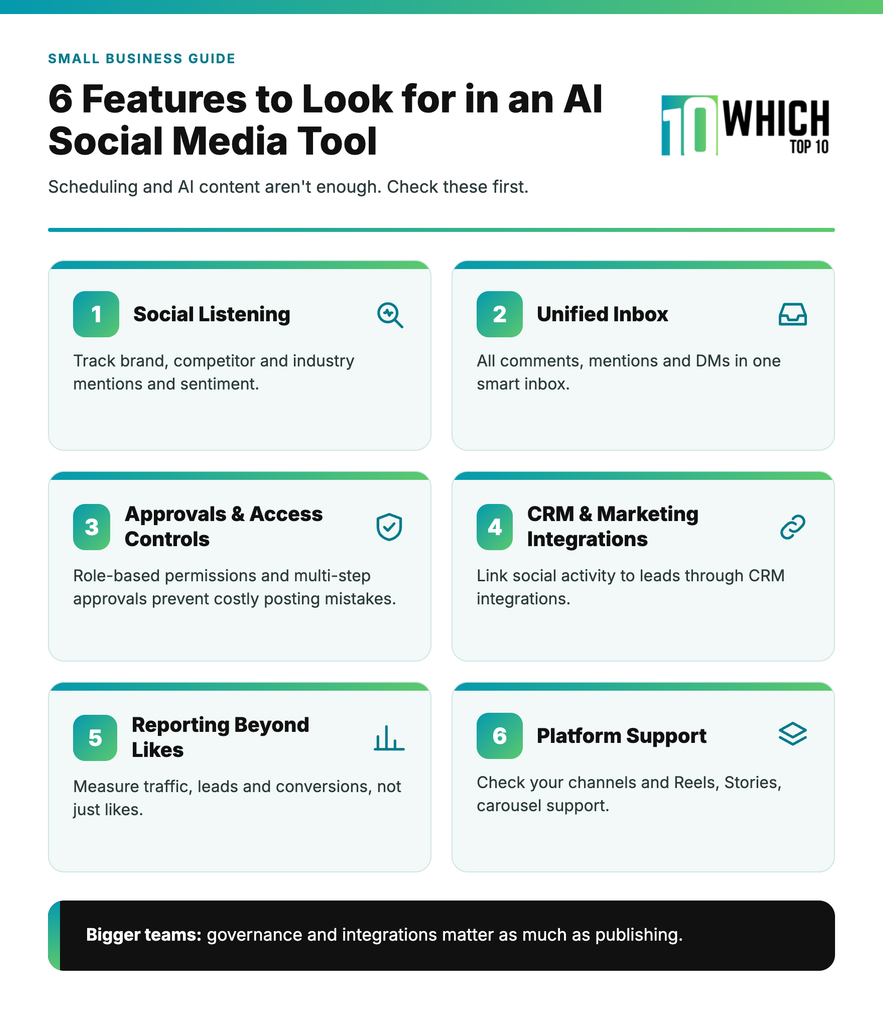
Features to Look for in a Social Media Management Tool
Depending on the platform for just scheduling and AI content production may mean missing out on vital management needs. Think about the following features before buying a subscription.
- Social Listening
Social listening allows businesses to track brand mentions, competitor activity, industry conversation, and customer sentiment even when it’s not on the business’s social profiles. This is not a social inbox that focuses on interactions around the accounts you manage. See which networks and external sources are the platform tracking.
- Auto-provisioning Users and Groups
You have all comments, mentions and direct messages in one workspace, with a unified inbox. Advanced platforms can classify incoming conversations into topics or sentiment and assign them to suitable team members. This can come in handy for businesses that are getting requests from customers, sales inquiries and customer support over social media.
- Workflows and access controls for approvals
A common content calendar isn’t enough for businesses with more than one brand, or for businesses servicing their clients in the same way. Check for role-based permissions, multi-step approvals, task assignments and content history. These controls will prevent or minimise unauthorised posts and minimise errors prior to the campaigns going live.
- CRM Integrations & Marketing
See if the platform integrates with your current CRM, analytics and DAM software. CRM integrations can help teams correlate social interactions with leads and customer records, and asset integrations can make approved brand images and videos easily accessible.
- Reporting beyond Likes and Comments
It is not always evident if a social media campaign yields business outcomes from engagement metrics. Pay attention to reports on referral traffic, leads, conversions, audience growth and paid campaign performance.
- Platform Support and Publishing Restrictions
Not all tools are created equal, and not all content types or social networks will be equally supported. Prior to signing up, make sure that support is offered for the channels you need, such as Threads, TikTok, YouTube, and LinkedIn. Check if Reels, Stories and carousels are available for direct publishing or need mobile notifications.
These considerations are particularly important for larger teams, where listening, governance, customer routing, and integrations can matter as much as publishing
Conclusion
Choosing the best AI tools for social media content creation is ultimately about finding a solution that fits your team’s workflow, publishing requirements, and reporting needs
When signing up for a subscription, take into account how easy it is to integrate it with your current tools, how it will scale to meet your demands as your account expands, and how it will fit into your approval procedure. While AI can help minimize repetitive tasks, businesses must also have content strategies, accurate reporting and oversight from human eyes.
Try the platform and test it with real campaigns before committing to a long-term investment, and focus on the features that address your real management needs.
Frequently Asked Questions (FAQs)
Use UTM parameters in campaign links to track social media traffic in Google Analytics 4 (GA4). Track purchases, form submissions, and other conversions to track real business results.
Search for independent client workspaces, role-based permissions and approvals. Make sure that clients own their social media pages and can terminate access by the agency if it is needed.
Not always. Some platforms allow CSV or PDF exports, but it may not be possible to export historical audience insights and engagement data. Export important reports and campaign records before cancelling your subscription.
There are social networks that limit third-party publishing about certain formats and features. Users might be required to publish the story, interactive sticker or some video types through the social media app.
The ownership and usage rights are based on the provider’s conditions and the copyright laws. When using AI-generated content for commercial purposes or client campaigns, check the permissions and restrictions for commercial use.